
Introduction
Fuga has an integration with Fidin. With it, you fetch the electronic delivery notes of Aesculaap, AST Farma (Dechra), Boehringer Ingelheim, Dopharma, MSD, NL Pharma and Virbac. You then no longer need to enter the delivered quantity, the lot number and the expiry date in Fuga yourself.
Configuration
Step 1: request the link from Fidin
- Go to Configuration => Practice data, tab Locations.
- Click the eye icon next to the depot address. You see the integration token of that depot. This is your VetCIS ID.
- Fill in Fidin's request form and enter the token as VetCIS ID.
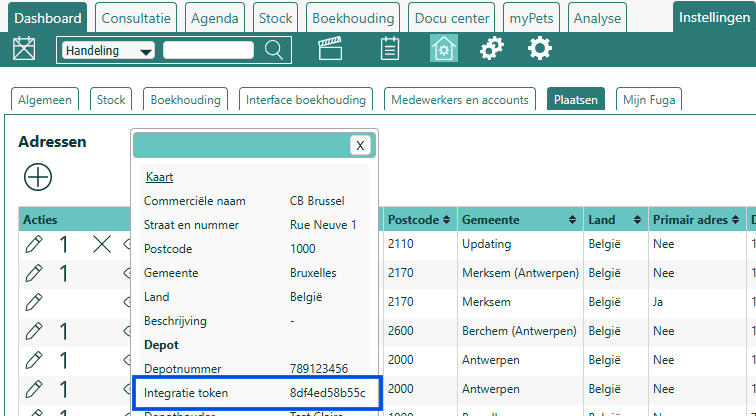
Fill in the form for each depot for which you want to receive delivery notes via Fidin. If you later create a new depot (for example after a change of address or a new depot number), that depot gets a new token. Send that new token to Fidin as well.
The form also asks for your customer numbers at the suppliers. These are not stored in Fuga. You find them on the supplier's invoices or delivery notes, or in your account on the supplier's website.
Step 2: set up Fuga
- Make sure each supplier exists as a supplier in Fuga. See How do I link my supplier to Fuga?
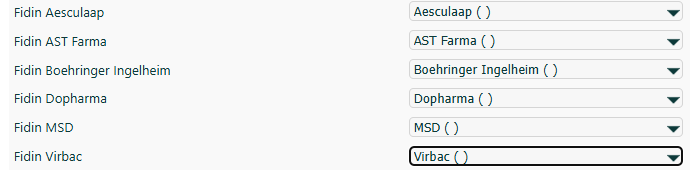
- Go to Configuration => Practice preferences => Stock. Under "Mapping of supplier interfaces to supplier", choose your supplier next to each Fidin interface (for example Fidin MSD). Click Save.
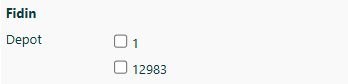
- On the same page, in the right-hand column, tick the depots for which you want to use the Fidin link. Click Save.
Fetching delivery notes
- Work in a depot that you ticked in step 2.
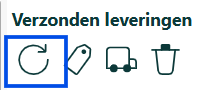
- Go to Stock => Shipped deliveries and click the round arrow (
 , "new deliveries?").
- Tick Fidin at the bottom and click next.
- Take the delivery notes into your stock with the truck icon (
 ): per product with the small truck, or everything at once with the large truck at the top.
Fuga fetches up to 20 delivery notes at a time. If you expect more, click the round arrow again.
Fuga looks up the product by name. If Fuga finds no product with that name, Fuga creates a new product. You find it under Stock => Reports => Underspecified products.
Ordering
Ordering via Fidin is not possible. You order directly from the supplier as usual. Via Fidin, Fuga only fetches the delivery notes.
Troubleshooting
You get "Fidin Error: ... No account found for VetCis number"
Fidin has no active registration for the VetCIS ID of this depot. The number in the message is the integration token of your depot. If you have not filled in Fidin's request form yet, or if you have recreated the depot since, fill in the form with the current token. If the link worked before, ask Fidin whether your registration is still active.
Fidin is not shown in the "new deliveries?" window
You are working in a depot that is not ticked for Fidin, or no supplier is linked to a Fidin interface yet. Switch to the right depot, or complete step 2 of the configuration. The same cause gives the message "Fidin Missing configuration".
You cannot find your supplier in the list next to a Fidin interface
The list only shows suppliers that already exist in Fuga. First create the supplier via Stock => Actions => Add supplier. It then appears in the list.
The delivery notes of one supplier do not arrive, those of the others do
First check that this supplier is linked under "Mapping of supplier interfaces to supplier". If it is, Fidin sends no delivery notes from that supplier for your VetCIS ID. Each supplier switches on the electronic delivery note separately. Ask the supplier whether the electronic delivery note via Fidin is active for your VetCIS ID.
The delivery note of a delivery from before the link does not arrive
Fidin only sends delivery notes from the moment your link is active. Older delivery notes no longer arrive. Enter those lots yourself via Stock => Products => open the product => new lot.
You get an error message when fetching a delivery note
Contact Sonetas and mention the error message. Fuga keeps trying to fetch the same delivery note. The delivery notes behind it only arrive once that delivery note has been processed.
After the first delivery there are duplicate products
The product name on the delivery note differs from the name in Fuga, so Fuga created a new product. Merge the products via Stock => Reports => Underspecified products. On the next deliveries, Fuga then recognises the supplier's name automatically.