
Fuga is being renewed.
We are not renewing Fuga to make it look new, but to make it work better.
Behind the scenes we have been working for some time on a thorough transformation of Fuga, which we call Fuga Next. Fuga Next is the name for this complete renewal. This is an ongoing process that will unfold gradually over the coming months: the renewal is rolled out step by step, in small doses. What you see today is one of the first visible steps in it: a more modern navigation through Fuga, in line with other modern web applications such as Outlook, Facebook and ChatGPT. The calendar and the consultation will follow after that.
Why are we doing this?
Over the years Fuga has grown enormously: more features, more screens, more possibilities. That is a richness, but it also makes a program heavier and busier to work in. Meanwhile technology does not stand still, and your practice runs busier than ever — every click and every second during a consultation counts.
That is why we are renewing Fuga from the ground up: a modern, fast foundation that stays clear, even as more features are added in the future. Not a make-over for show, but a foundation that keeps Fuga smooth, stable and ready for what is coming, for years to come.
And we are deliberately doing it step by step, not in one big bang. That way your practice keeps running, you get used to each change at your own pace, and we fine-tune every step based on what we hear from you. Your daily work comes first — not the technology behind it.
What is changing?
Fuga is gradually getting a more modern, clearer shell around the familiar Fuga you use today: the same screens and the same data, but with fresher navigation, a central search bar and a more modern working environment. Not everything changes at once — you will see the renewal appear step by step. Behind the new navigation you will find the same screens and the same data.
What does it give you?
These first visible changes bring, among other things:
- One central search bar that searches clients, persons, animals and products at once, also when you use several search terms.
- A renewed, clear navigation with your work context (depot, consultation room, till), notepad and shortcuts always within reach.
- Also on your phone: a tab bar at the bottom of the screen. Everything else you need, such as Latest news, My preferences and Notepad, is under More.
- The same trusted Fuga underneath: the way you work does not change, it simply becomes faster.
- A solid foundation on which the next screens and improvements will keep being built over the coming months. Whoever joins now is the first to benefit.
What is still coming?
The renewal continues step by step in the period ahead. After the navigation, it is the turn of the calendar and the consultation. Those changes directly affect your daily work. If you already use Fuga Next, you will already be familiar with the new environment by then.
We will gradually keep modernising the screens and workflows you use every day, always with the same goal: more comfort and ease of use. Everything we develop is aimed at making your daily work smoother and at keeping Fuga ready for the future and its further developments. There is no need to worry: the changes come calmly and in small steps, your familiar way of working is preserved, and we take you along at every stage.
Stay informed via Latest news
Keep a close eye on "Latest news" on your Fuga dashboard. Every time a renewal or change goes live, we explain it there. That way you immediately know what is changing and what it means for you.
Joining early — it is your choice
Would you like to be among the first to use the new features? You can. Switching it on and off is a personal setting: every user decides for themselves and can switch at any time, entirely to their own preference. Your colleagues will not notice anything, and you work with your usual login in the same data.
And you are free to switch back and forth. You are happy to follow the new developments, but we all remain a little bit creatures of habit. On a quiet moment you enjoy discovering what is new; when the practice is busy and you are working on autopilot (read: old habits), you switch back to the familiar view with a single click, without having to search through the newer menus. Nothing is lost.
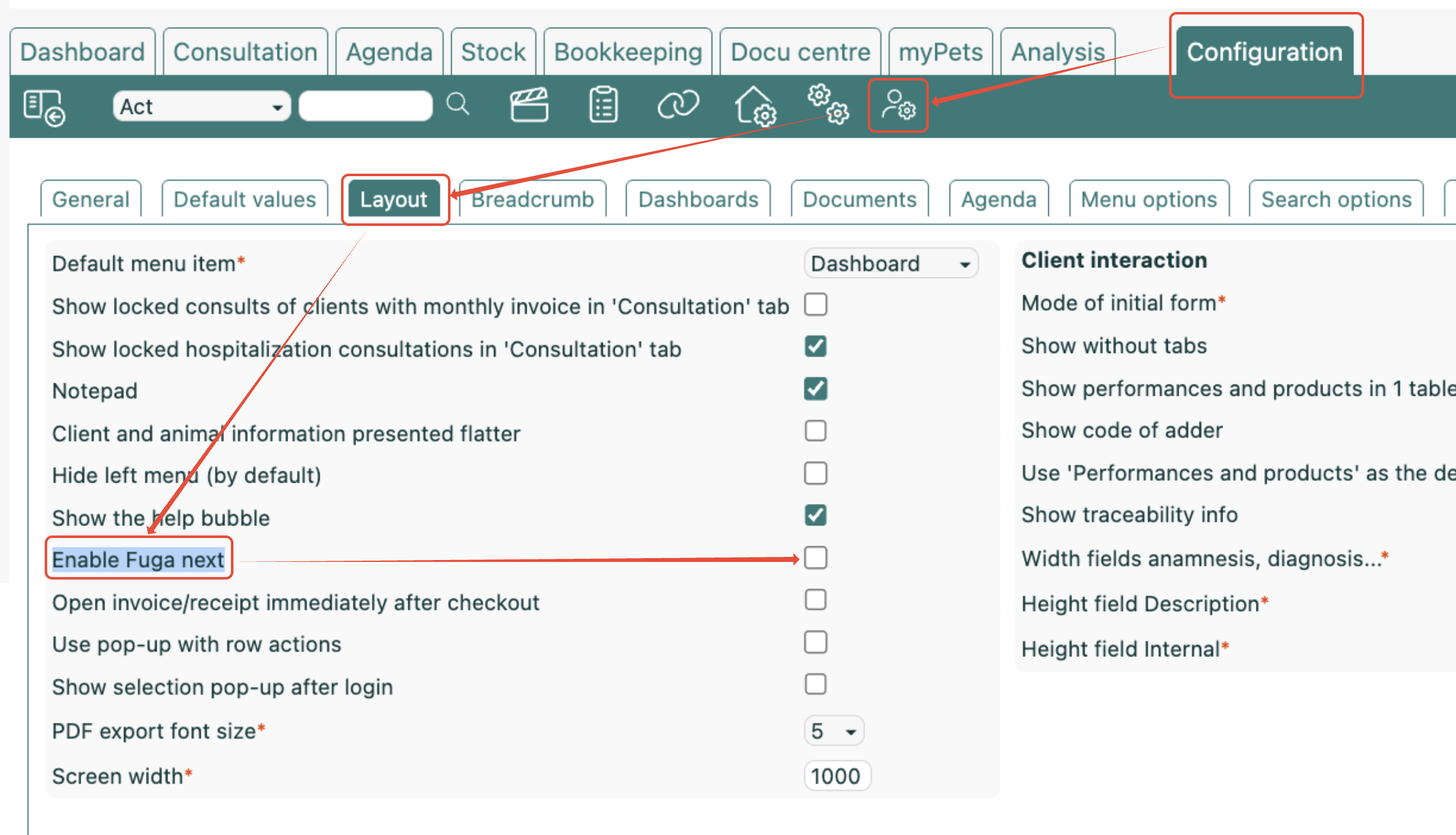
To switch Fuga Next on:
- Go to Configuration => My preferences => Layout.
- Tick Enable Fuga next.
- Click Save.
You are in the new Fuga right away, without logging in again.
Want to go back to the familiar Fuga? Click the Fuga Next switch in the sidebar. On your phone, you will find that switch under More. You can always switch Fuga Next back on afterwards as described above.
Join in and help build
We invite you to use the new features in your daily work as they keep growing. Do you notice something that does not work as expected, or do you have an idea to make it better? Let us know. That way you help shape the new Fuga and become one of our ambassadors.
You can share your comments through the Fuga Next switch itself: when you switch Fuga Next off, a window appears in which you can tell us what could be better.
Sneak preview, becoming a tester or receiving the recording
Would you like to watch an online sneak preview, sign up as a tester, or receive the recording of the information session to watch at your own pace? Sign up via our sign-up form. There you choose for yourself what you would like.