
Fuga allows you to submit the registration to AB Register directly from Fuga.
Settings
You activate the registration by ticking Settings => Practice preferences => Belgium tab => AB Register. Next you fill in your AB Register username and password. Please note: these are not the username and password you use to log in to the AB Register website. You can find the correct details on the AB Register website under 'Webservices Settings'.
For AB Register it is important that your order number also contains the leading 'N' (or 'F') (see Settings => My preferences => General).
Usage
Client record
The herd numbers of the pig and cattle clients must be filled in and must be entered in the format BE12345678-0201 and BE12345678-0101 respectively. Here you can find how to enter multiple herd numbers at the same address.
Animal record
In the animal record you will see, under 'AB Register category', various options depending on the animal species:
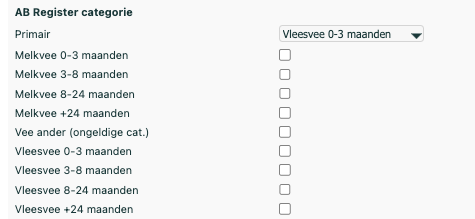
Per animal (group) you can indicate the default category (Primary) and which categories are also present in the herd. You will then be able to choose from the selected values in the consultation.
Product record
The cti-ext code of a medicine is used to inform AB Register about which medicine and which packaging the registration concerns. Consequently, you must fill in the cti-ext codes. This code is not supplied by suppliers. However, Fuga will try to fill in the cti-ext codes itself based on the cnk code. This happens when a product is read in for the first time on delivery or via the action Add cti-ext and AMCRA antibiotic codes under the tab Stock. If this does not work, you can find here the medicine lists that AB Register uses so you can look up and fill in the code yourself:
In the product record you will have a new field 'Number of units (ml, g, units) per product'. Here you enter how many of these units are contained in the product. If you have a package of 750 g, the value is 750; a package of 1.5 kg, the value is 1500. A 2 litre container, the value is 2000.

Registration with AB Register
During consultations Fuga keeps track of which products must be reported to AB Register. An outgoing product will be reported to AB Register if:
- the product is an antibiotic,
- the animal is a pig or a bovine,
- the animal has an 'AB Register category'
- the herd number is specified.
From 01/01/2026, goats and sheep can also be registered via AB Register. You can find more information on the AB Register website.
At the end of the month you can go to To be submitted to AB Register and press 'Submit to AB Register' to carry out the registration with AB Register. You can do this either per product or for all products. You can also remove products from the list. Please note that you must complete the registration on time (https://www.abregister.be/nl/2026/):
From 1 January 2026 a veterinarian can still make changes to the registrations up to and including the 14th day of the second month after the quarter. After that, adjustments can no longer be made directly by the veterinarian. This data is considered correct and final and will be used for the benchmark reporting. If, exceptionally, a change is nevertheless needed, the veterinarian can submit a motivated request for change, together with the original administration and supply document (TVD), to the helpdesk.
Via the report Submitted to AB Register you can also request a list of products you have already registered with AB Register.
In case of problems, it is best to check the following
- whether your AB Register account is entered in Fuga (with the correct password)
- the order number under Settings => My preferences => General must begin with F or N
- whether the AB Register categories are filled in for the animal in the animal record
- whether the herd numbers are filled in and in the correct format
- In the product record of each product to be registered:
- Is "Number of units (ml, g, units) per product" entered
- Check the cti-ext code (we usually fill this in for you, sometimes this is not possible)
- Is the 'Antibiotic' box ticked
- Whether a TVD has been created for the consultations for which products must be registered
- If the TVD does not appear in the 'To be submitted to AB Register' list, then you have not yet locked the consultation. Return to the relevant consultation and lock it. At this stage it is not yet necessary to create a settlement.
Possible error messages from AB Register
- Element PROVIDER is undefined in THIS - The order number of the treating veterinarian is not filled in in his/her personal preferences.
- Message from AB Register: No producer found with herd number X - This error message indicates that the farmer has not yet registered his/her herd number with AB Register. It is best to report this to your client.
- Message from AB Register: Registration can no longer be changed - You are too late with the registration. You need to contact the AB Register helpdesk to sort this out.
- No TVD present in consultation/sales - You have not yet created a TVD document in the consultation.
General information about AB Register
AB Register was developed in 2014 by Belpork vzw and was thereby the first data collection system in Belgium able to map antibiotic use on pig farms. In 2017, AB Register was extended to the poultry sector, and from October 2018 dairy farms have also been able to monitor their antibiotic use via this system.