
There are two ways to add acts in Fuga: manually via the settings screen, or in bulk via an Excel file.
In this article:
1. Adding an act manually
Go to Settings => Actions => Add act. You can also click the plus button from the overview of acts (type * in the search bar).

Fill in the following fields:
- Name — give the act a clear name. You can also set language-specific names (Dutch, French, English) that automatically appear in the correct language on invoices and receipts.
- Label — optional. Handy for grouping acts for reports and filters.
- Animal class — optional. Restricts the act to consultations of a certain animal class (and optionally a specific species).
- Pricing — choose between Fixed price (unit price excl. VAT) or Relative price (percentage on top of the services in the consultation (not on the products), e.g. for a night or weekend surcharge).
- Description — optional free text field.
After saving, the act is set to Not published. Click the Publish icon ( ) to make the act available in protocols and consultations. After publication, the name, type, animal class and species are locked on the edit screen. The other fields remain editable via the Edit icon (
 ).
).
2. Importing acts via Excel
Would you like to add multiple acts at once? Then use the Excel import. Always start from our sample file at the bottom of this article — not from a list you export out of Fuga. Such an exported list is meant to be read, not to be re-imported.
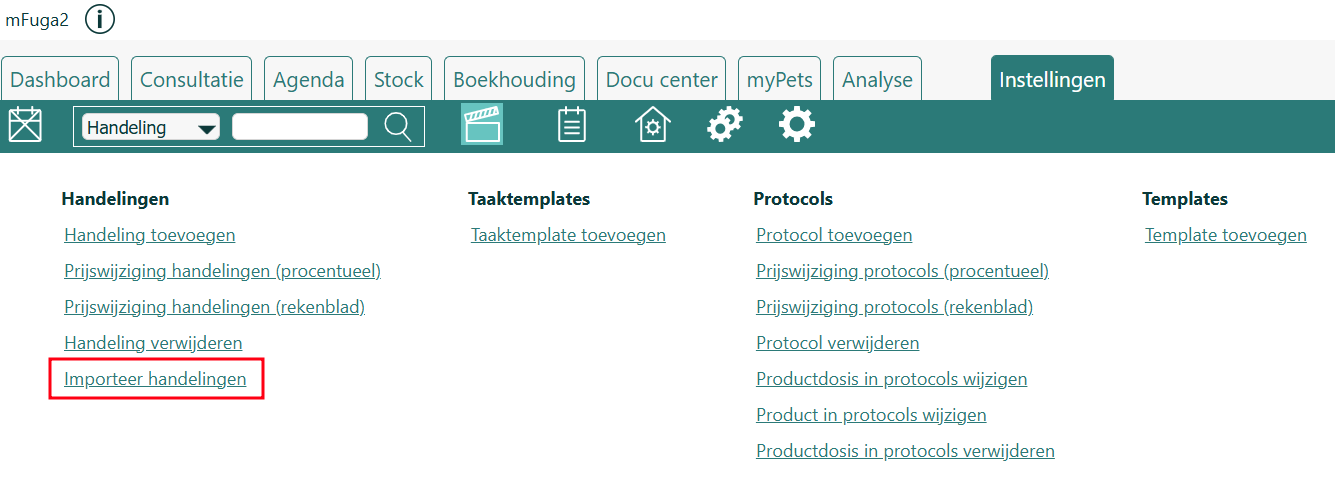
Proceed as follows:
- Download the sample file at the bottom of this article and open it.
- Enter your acts on the Acts tab, under the existing column headers. Do not change or translate the headers in the first row, and do not add a letter T in front of them.
- To add a new act: leave the Id column empty.
- To modify an existing act: enter that act's internal number in the Id column (see "Where do I find the Id of an existing act?" below).
- Save the file as Excel (.xlsx). A CSV is not accepted: open it in Excel and choose Save As => Excel Workbook (.xlsx).
- Import via Settings => Actions => Import acts, choose your file and click Save. You then get an overview of the number of acts processed and any errors.
Rules
- Use the column headers exactly as in the sample file. The order does not matter, but the spelling does.
- Do not add a letter T in front of the headers and do not translate them. A header that differs (e.g. TId, TAnimalSpecies or Espèce) is ignored. If the Id column is not recognized, the import creates a new act instead of updating the existing one.
- Only .xls and .xlsx are supported, not CSV.
- Use text values only, no formulas or calculations.
- Fill in every row you use completely. An empty UnitPrice causes an error on that row. If you leave Published or Active empty, the act is set to not published or not active.
Columns
| Column | Required? | Explanation |
|---|---|---|
Id | No | Leave empty for a new act. Fill in to update an existing act. |
name | Yes | Name of the act. Also when updating via Id, you must fill in the (current) name. |
NameDutch | No | Dutch name (appears on invoices etc. for Dutch-speaking clients) |
NameFrench | No | French name |
NameEnglish | No | English name |
Label | No | Label for grouping/filters (max. 20 characters) |
Description | No | Description of the act |
AnimalSpecies | No | Animal species (see list at the bottom). With or without the T-prefix, e.g. Dog or TDog. |
RelativePricing | No | true or false (false = fixed price) |
UnitPrice | No | Unit price (excl. VAT). Enter a number; do not leave the cell empty if you use the column. |
Published | No | true or false. Empty = not published. |
Active | No | true or false. Empty = not active. |
Adding only a species to existing acts
In that case, use a file with only three columns: Id, name (the exact current name) and AnimalSpecies. All other fields then stay untouched. A column you leave out stays unchanged; a column you do include but leave empty clears that field.
Where do I find the Id of an existing act?
The Id is not shown on the act screen itself. You find it by exporting the acts list: go to Settings => Actions, open the acts overview, and use the extended export (the csv_2 button). That file contains a column with the Id per act. Copy that value into the Id column of your import file. This export only serves to look up the Id and cannot be reused directly as an import file.
Updating existing acts
In that case, fill in the correct Id. Only the columns present in your file are modified. A column you leave out stays unchanged. A column you do include but leave empty clears that field. So only include the columns you want to change, together with Id and name.
Too many or duplicate imports? How to delete acts
Did something go wrong and acts appear in duplicate? You can delete an act as long as it has never been used (never on a consultation or in a protocol).
- Go to Settings => Actions => Delete act.
- You get the list of not-yet-used acts. Find the duplicates and delete them one by one.
An act that has already been used cannot be deleted. You can set it to inactive via Settings => Actions, open the act and deactivate it; it then disappears from the selection lists but is kept in the history. Deleting acts in bulk is not possible.
Would you like help with this process? Contact us for guidance. If you would like us to do it for you, this will be a scheduled and billable action.
Possible values for AnimalSpecies
With or without the T-prefix (e.g. Dog or TDog, Cat or TCat).
| Mammals | Birds | Other |
|---|---|---|
| Dog, Cat, Rabbit, Horse | Parrot, Pigeon, Hen | Tortoise, Lizard, Snake |
| Hamster, GuineaPig, Rat, Mouse | BirdOfPrey, Owl, Turkey | Frog, Salamander |
| Ferret, Chinchilla, Gerbil | Gallinaceous, Ostrich | Carp, Salmon, Perch |
| Cattle, Calf, Sheep, Pig, Goat | WaterBird, SingingBird | Bee, Spider, Crustacean |
| Donkey, Mule, Alpaca, Llama | Stork, Crane, Hawk | BlueMussel, Oyster, Scallop |
| Hedgehog, Skunk, Deer, Bear | Pelican, Woodpecker, Cormorant | Cuttlefish, VenusClam, Cockle |
| Kangaroo, Wallaby, Bat, SugarGlider | Grebe, Turaco, Otidiformes, Roller, WadingBird | CCrocodile, NotSpecifiedReptile, NotSpecifiedAmphibian, NotSpecifiedArthropod, NotSpecifiedMollusc, NotSpecifiedFish |
| Badger, Mink, Beaver, Dormouse, Vole, Degu, Squirrel, Mara, PrairieDog, BactrianCamel, Dromedary, Monkey, NotSpecifiedMammal | NotSpecifiedBird | Catfish, FlatFish, Cod, Eel, Mullet, Pike, ScorpionFish, Minnow, Sturgeon |