
To create a new client, go to the Consultation tab. Under the actions, choose Add client.
In the form that appears, you fill in the various details about the client. Note that you need authorisation from the Privacy Commission to store a national number for your clients. The national number field only appears if you have ticked the option 'Practice is authorised to store the national number' under Configuration => Practice preferences => General.
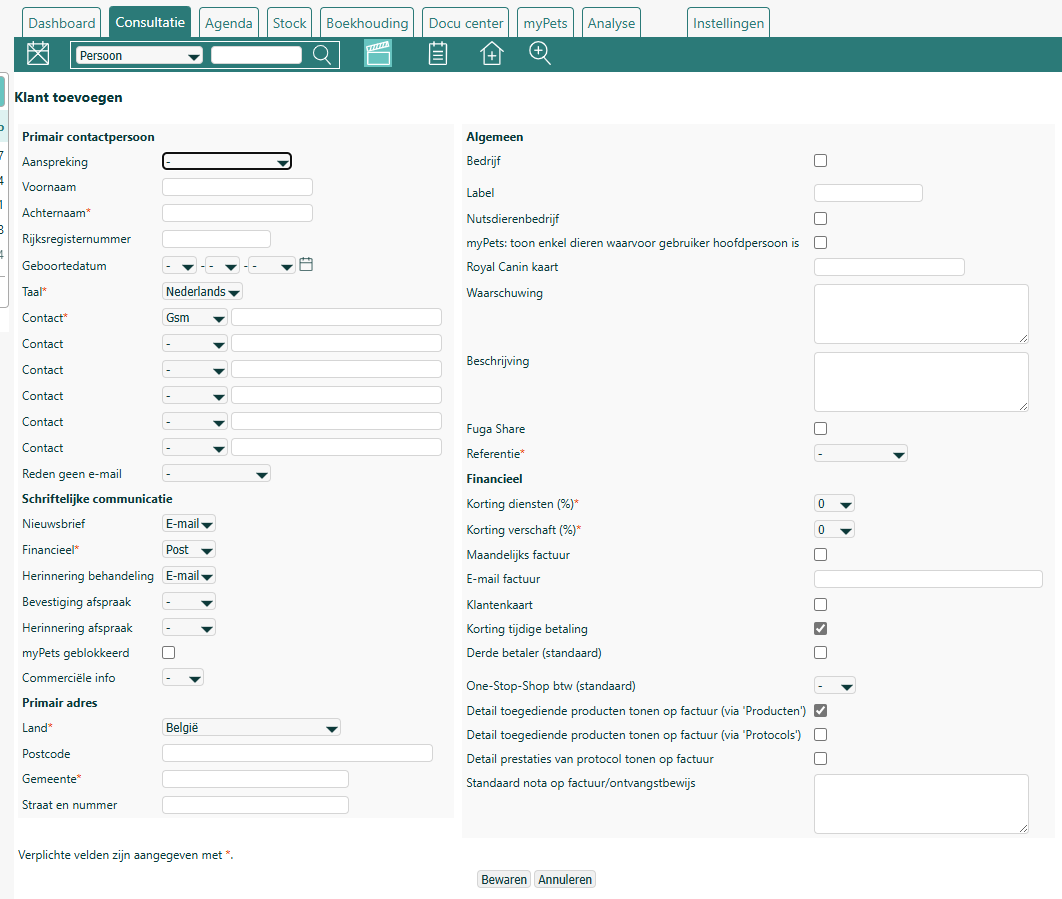
As soon as you add an email address to a (new or existing) client record, Fuga sends a welcome email. In that email, clients can adjust their own communication preferences, which was implemented in the context of the GDPR. If you want to deactivate this, select no template (-) under Configuration => Practice preferences => General.
Under Written communication you indicate through which medium the client wants to receive written communication. If you select 'Email', you must also enter a valid email address in the contact details. The 'Sms' option is only shown if the link with our external SMS system has been set up (see here for more information). If you tick the option 'I want to receive commercial information from my vet (not from third parties)', the client will be included in the list when you run a commercial communication (e.g. a newsletter with promotions).
You can also enter a few financial details, which can still be adjusted in the consultation or sale itself. For example, you can set a default discount on services and goods (sales); the possible values can be configured under Configuration => Practice data => Bookkeeping. You can also enter an email address to be used for invoices — you may enter several email addresses here, separated by a comma. You can indicate whether the client uses a loyalty card (see here for more information), or whether they receive a discount when they pay within the payment term (set the value under Configuration => Practice data => Bookkeeping).
Using eID to add a new client
If you want to read in the details of a new client via an eID reader, you need to do the following preparatory work:
- Install the eID software, if you have not done so before. Instructions can be found at https://eid.belgium.be/en.

- Install the eID viewer, if you have not done so before. Instructions can be found at https://eid.belgium.be/en.

- Activate eID in Fuga via Configuration => My preferences => General => Use eID.
- To read the data from an eID into Fuga, do the following:
Connect your card reader to your computer
Open the eID viewer application
Insert the eID into the card reader. If all goes well, you will see this message in the eID viewer.

Wait until you see the card data in the eID viewer
In Fuga, go to the screen to add a new client
Drag the photo from the eID viewer onto the eID icon in Fuga
The required details are filled in automatically
