
What is Fuga SMS?
Fuga SMS is the service that lets your practice send SMS messages without needing your own account with external parties like Spryng or Clickatell. Sonetas manages a central Spryng account with a dedicated sub-account for each practice. You simply enable the option in your settings, and SMS sending works from that point on. The practice is invoiced by Sonetas based on actual usage so you do not need to purchase credits up front.
Using SMS in Fuga
From within Fuga, you can send SMS messages in several ways:
Automatic messages
SMS messages can be sent automatically, for example:
- Treatment reminders
- Appointment confirmations/Cancellations
- Appointment reminders
(See here the related documentation for configuring confirmations and reminders.)
Manual messages
You can send a message manually by clicking on a client's phone number.
- You can choose a free text message or a template
- Only templates relevant to the current context are shown
Bulk SMS for Marketing
It is also possible to send SMS messages in bulk. This follows the same workflow as sending e-mail newsletters (for more info, click here).
Prerequisites
Fuga SMS is automatically available for all existing and new practices.
Enabling Fuga SMS in your practice settings
Go to Settings => Practice Preferences => E-mail & SMS.
If your practice wants to start sending SMS messages from Fuga
- Simply select the Fuga SMS checkbox to start using Fuga SMS. You still have to configure for which events you want to use SMS. Here is the related documentation for configuring confirmations and reminders.
If your practice already sends SMS messages from Fuga
- This will still work as before: the current gateway remains selected in the SMS gateway field and SMS messages are sent using your 'old' account. The old gateways will disappear at the end of 2026.
- When you have finished using the credits in your old account, be sure to turn off any auto top-up of credits, and switch to Fuga SMS by simply selecting Fuga SMS as SMS gateway.
Switching client communication preferences to SMS
To effectively use SMS for appointment confirmations and reminders, your clients' communication preferences must be set to SMS. You can change this in bulk for all your clients so you do not have to open each client file individually.
Go to Consultation => Show all actions => Adjust communication preferences
In this screen, you can set the desired channel per preference:
- Appointment confirmation
- Appointment reminder
- Treatment reminder
- Newsletter
- Financial
Choose SMS for the desired fields. The available options per field are:
- - = do not change (keeps the current value)
- No value = remove preference (no automatic communication)
- Email = communication via email
- SMS = communication via SMS
- Post = communication via post
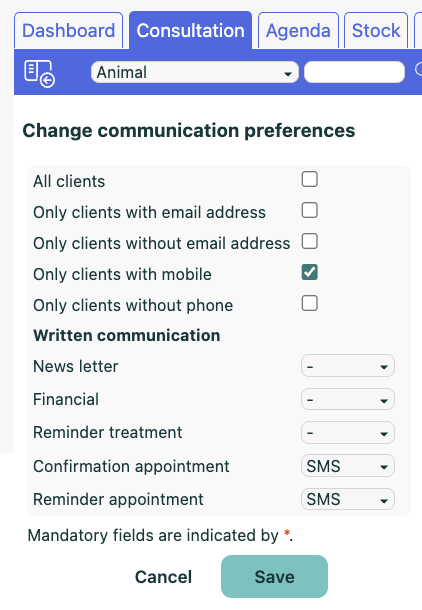
You can also filter on clients who do or do not have a mobile number or email address, so you can specifically target only clients with a mobile number.
Viewing your SMS credit usage
Once Fuga SMS is active, you can see how many credits your practice has used each month.
Go to the Analysis module. In the Communication section, open the Used Fuga SMS credits report. This report is only visible when Fuga SMS is selected as the SMS gateway for your practice.
The report shows one row per billing period with the following columns:
- From: start of the period
- To: end of the period
- Quantity: number of SMS credits used
Use the Year and Month filters at the top to narrow down to a specific period. Without filters, the report shows all available periods.
Why Credits instead of Cost?
We work with credits because the cost of an SMS can differ per country. One SMS credit is charged at €0.092. The following amount of credits is required for an SMS of maximum 160 characters to a recipient in a particular country. In case of longer messages, multiple SMS credits will be used.
| Country of Recipient | Credits / SMS of 160 characters |
|---|---|
| Belgium | 1.00 |
| France | 0.81 |
| Germany | 1.46 |
| Luxembourg | 0.69 |
| Netherlands | 1.13 |
| Switzerland | 0.54 |
Careful
Some characters, mostly French (ô, â, ê, î, ç, ù, ë, ï, œ, æ), are not part of the standard SMS character set. When used, an SMS is limited to 70 characters instead of the normal 160. A bulk send of an SMS with such a character can consume a lot of credits.
French characters that are supported within the 160 character limit:
- à
- è
- é
- ù
- Ç
- É
Cost examples
Fuga SMS is billed at a fixed rate of €0.092 per SMS message. Below are some common usage scenarios to give an idea of the cost:
Vaccination reminder
1 SMS per patient = €0.092 per credit
Example: 100 patients = €9.20
Appointment confirmation
1 SMS per appointment = €0.092 per credit
Example: 50 appointments = €4.60
Appointment reminder
1 SMS per appointment = €0.092 per credit
Example: 50 reminders = €4.60
Combined flow (confirmation + reminder)
2 SMS per appointment = €0.184 per patient
Example: 50 patients = €9.20
These examples are indicative. The total monthly cost depends on the number of SMS messages sent by your practice.
SMS Sender
When sending SMS messages through Fuga SMS, the messages are not sent from your practice's mobile phone number. Messages are sent through a central sender number that is used for automated communications, similar to two-factor authentication codes and other automated notifications.
Clients can receive these messages, but they cannot reply to them. Any replies will not be delivered to your practice. We therefore recommend clearly indicating in your SMS templates how clients can contact your practice if needed, for example by phone or email.
Notes
- Usage data is refreshed automatically every night. Credits used today will appear in tomorrow's report.
- SMS sending works the same way as before — no changes are needed to your templates or workflows.
- If your practice previously used automatic credit top-ups (auto-purchase when reaching a minimum balance), it is recommended to disable this feature when switching to Fuga SMS. Since Fuga SMS is billed based on actual usage, automatic credit purchases are no longer necessary and may lead to unintended extra costs.