
Setting a customer's communication language
In Fuga, you can set a language per customer. That language determines which language communication to that customer is sent in: e-mails, appointment, vaccination and payment reminders, and documents or templates provided per language.
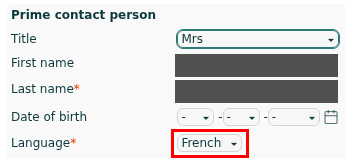
English, French and Dutch are available by default as communication languages. Fuga now also supports German, so you can write to your German-speaking customers in their own language too.
Setting the available languages for your practice
You manage the available languages at practice level. This is where you change the order of the languages or add an extra language such as German:
- Go to Configuration => Practice data
- On the General tab you will find the section Languages for communication with customers
- Under Main language, choose your practice's default language
- Use the additional language fields to add the extra languages you want to use, or change their order
- Save your changes
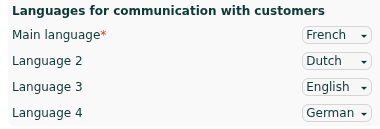
You can also remove a language from the list by setting the relevant language field to "-" and saving. The main language cannot be removed, but it can be changed.
The languages you set here then appear as an option on each customer's record.
Changing a customer's communication language
- Open the customer's record
- Click edit
- Choose the desired communication language under Language
- Save
From then on, communication to this customer is sent in the chosen language, provided a template or translation is available in that language.
What happens to existing documents when you change the language?
A document's language is fixed at the moment the document is created. If you change a customer's language afterwards, that new language only applies to documents you create after that. Invoices, credit notes and other documents that already exist keep their original language.
A few examples:
- In March, you create an invoice for a customer set as French-speaking at that time. That invoice is and stays in French.
- In June, you change the same customer's language to German. From then on, all new invoices, reminders and e-mails are sent in German.
- The March invoice stays in French, even if you open or download it again later.
Templates and names
The standard templates (such as e-mails and documents) are available in all four languages too, so communication can be sent entirely in the customer's language.
Don't forget to set up the right templates in your practice preferences for each language you use, so that communication is actually sent in that language. Think for example of:
- Appointment confirmations and appointment reminders
- Payment reminders
- Welcoming e-mail (Practice preferences => General => Welcoming e-mail)
- Invoice or receipt e-mail (Practice preferences => Documents)
- Treatment and vaccination reminders
Also think of your protocols that automatically send e-mails, text messages or letters: set the right template per language there too, so that those messages are also sent in the customer's language.
In addition, the Language specific names setting (Practice preferences => Documents) lets you also give your products, protocols and acts a German name, so that everything appears consistently in the right language. If you leave the language-specific name empty, Fuga simply uses the default name of that product, protocol or act.
myPets
In myPets, for now only English, French and Dutch remain available as a language choice for users. German is not yet supported there at the moment.
Customer's communication language versus Fuga's display language
The language choice above only determines the language of communication to the customer. The language in which Fuga itself is displayed (the program's display language) is separate from this and is set via My preferences.