Fuga creates reminders based on the protocols you apply. You can let Fuga send them automatically, or send them yourself from the Expected treatments report.
How is a reminder created?
When you apply a protocol of the type Vaccination, Product treatment, Contraception or Other treatment in a consultation, Fuga creates a treatment status for that animal. It records when the animal needs its next treatment. You set the interval on the protocol. Here you can read how to add a protocol.
You can also change or create a treatment status yourself on the animal record, under Treatment status. When you create one, you choose a protocol, but no products are taken from your stock.
Sending reminders automatically
Fuga can send the reminders itself every evening: 14 days before a vaccination or other treatment, and 2 days before a product treatment. You switch this on under Settings => Practice preferences => Treatment Reminders. There are three separate settings:
- Automatic via mail: for clients with an e-mail address whose "Reminder treatment" preference is set to E-mail.
- Automatic via MyPets: for clients who have logged in to myPets at least once.
- Automatic via sms: for clients with a mobile number whose "Reminder treatment" preference is set to SMS. Fuga SMS must be activated for this (more about Fuga SMS).
These three settings are independent of each other. A myPets client whose preference is e-mail therefore receives both a myPets notification and an e-mail, if both settings are on.
On each protocol you choose with "Send automatically" whether that protocol is sent automatically. Do you want to change the preference of many clients at once? Use Consultation => Actions => Show all actions => Change communication preferences. Reminders by post are never sent automatically.
More details: Automatically sending treatment reminders. Are the e-mails not arriving? Read this article.
Sending reminders yourself via Expected treatments
Go to Consultation => Reports => Expected treatments and choose a period. The report shows every treatment that is due in that period. Example: an animal vaccinated on 1/5/2025 that needs its next vaccination on 1/5/2026 appears when your period includes 1/5/2026.
Two filters are useful here:
- Include customers with scheduled appointment: untick this to hide clients who have already booked an appointment.
- Include treatments with automatically sent reminders: unticked by default, so animals that already received an automatic reminder are not shown. Tick it if you want to see them anyway.
Click the @ to send by e-mail, the envelope to send a letter by post, or the speech bubble to send a text message. The clients whose preference matches that channel are selected by default. You can see those preferences in the overview by the green background behind the icons. You can still tick or untick clients yourself.

Your own reminder letter per protocol
Fuga includes a number of standard reminder letters. You can create your own version via a new template. Here you can read how. On each protocol you choose which reminder letter is used.
Which animals receive reminders?
All animals with the status Normal, Normal (2) or Normal (3). Animals with another status (for example deceased or sold) do not receive reminders.
Recalculating expected treatment dates
Go to Consultation => Actions => Show all actions. Under Appointments, click Recalculate Reminder Date.
Note: if the new date of a vaccination or other treatment falls in the past, Fuga plans it for the day of the recalculation + 14 days.
Error message when sending a reminder by e-mail
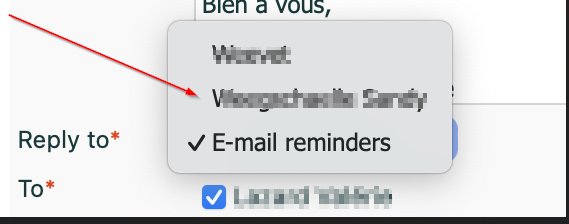
Do you get this error message when you send a reminder by e-mail?

Then choose a person under "Reply to" instead of the general "E-mail reminders" address, and send again.